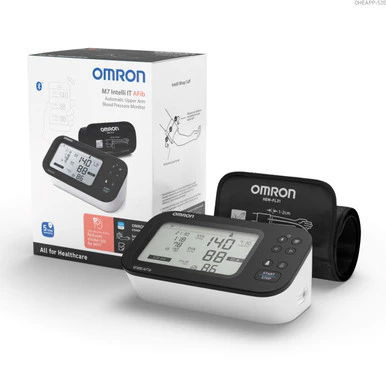
Omron M7 Intelli IT AFib Blood Pressure Monitor
Product features
##features##
- Advanced blood pressure monitor with AFib detection
- Bluetooth connectivity with Omron Connect app
- Intelli Wrap Cuff and dual user memory
##end-features##
Product description
The Omron M7 Intelli IT AFib combines professional-grade blood pressure monitoring with smart app connectivity and atrial fibrillation detection.
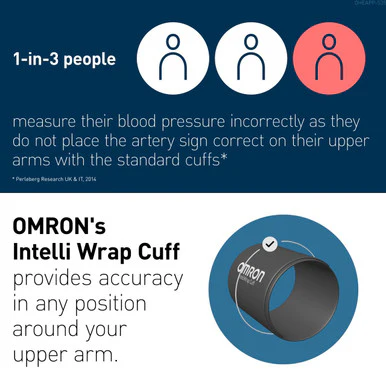
The Omron M7 Intelli IT AFib Blood Pressure Monitor is a premium upper arm monitor with advanced features for effective cardiovascular tracking. It automatically detects atrial fibrillation (AFib), a condition linked to increased stroke risk, and supports Bluetooth connection to the Omron Connect app for seamless monitoring and result sharing. The Intelli Wrap Cuff ensures accurate readings in any arm position, while dual-user memory supports tracking for two individuals. With clinical validation, this monitor provides trusted accuracy for at-home use.
Features of Omron M7 Intelli IT AFib Blood Pressure Monitor
- 360° Intelli Wrap Cuff and AFib detection for clinical precision
- Syncs with Omron Connect app for digital health tracking
- Stores readings for two users with morning and evening averages
##accordion-start##
Specifications
- Upper arm monitor with AFib detection, dual user mode and smart app sync
##accordion-item-end##
Suitable for
- Adults monitoring blood pressure and atrial fibrillation risk at home
##accordion-item-end##
Warnings and cautions
- Remain still and DO NOT talk while taking a measurement
- ONLY use the arm cuff on persons whose arm circumference is within the specified range of the cuff
- DO NOT fold or kink the air tube while taking a measurement. This may cause an injury by interrupting blood flow
- DO NOT use this monitor with other medical electrical ME equipment simultaneously. This may result in incorrect operation
- DO NOT disassemble or attempt to repair this monitor or other components. This may cause an inaccurate reading
- DO NOT use this monitor in a moving vehicle such as in a car or on an aircraft
- Ensure the monitor has acclimated to room temperature after storage at extreme temperatures
- ONLY use the approved AC adapter, arm cuff, batteries and accessories specified for this monitor
##accordion-item-end##
How to use
- Prepare for a measurement. 30 mins before it you shouldn't drink alcohol, smoke, have a hot shower, consume hot beverages, eat or exercise. 5 minutes before the measurement relax and rest.
- Download the OMRON connect app.
- Install the batteries.
- Pair the smart device.
- Set the date and time.
- Apply the arm cuff on the left arm. If using the right arm, refer to the instruction manual.
- Sit correctly and place your arm at your heart's level. Remain still and don’t talk.
- Select user ID 1 or 2.
- Take the measurement by pressing the START/STOP button. In TruRead mode, your monitor automatically takes 3 consecutive readings and displays the average.
- Check the readings. Consult the instruction manual for interpretation.
- After selecting your user ID, you can use the memory functions.
##accordion-item-end##
##delivery-accordion##
##accordion-end##

Description
Product features
##features##
- Advanced blood pressure monitor with AFib detection
- Bluetooth connectivity with Omron Connect app
- Intelli Wrap Cuff and dual user memory
##end-features##
Product description
The Omron M7 Intelli IT AFib combines professional-grade blood pressure monitoring with smart app connectivity and atrial fibrillation detection.
The Omron M7 Intelli IT AFib Blood Pressure Monitor is a premium upper arm monitor with advanced features for effective cardiovascular tracking. It automatically detects atrial fibrillation (AFib), a condition linked to increased stroke risk, and supports Bluetooth connection to the Omron Connect app for seamless monitoring and result sharing. The Intelli Wrap Cuff ensures accurate readings in any arm position, while dual-user memory supports tracking for two individuals. With clinical validation, this monitor provides trusted accuracy for at-home use.
Features of Omron M7 Intelli IT AFib Blood Pressure Monitor
- 360° Intelli Wrap Cuff and AFib detection for clinical precision
- Syncs with Omron Connect app for digital health tracking
- Stores readings for two users with morning and evening averages
##accordion-start##
Specifications
- Upper arm monitor with AFib detection, dual user mode and smart app sync
##accordion-item-end##
Suitable for
- Adults monitoring blood pressure and atrial fibrillation risk at home
##accordion-item-end##
Warnings and cautions
- Remain still and DO NOT talk while taking a measurement
- ONLY use the arm cuff on persons whose arm circumference is within the specified range of the cuff
- DO NOT fold or kink the air tube while taking a measurement. This may cause an injury by interrupting blood flow
- DO NOT use this monitor with other medical electrical ME equipment simultaneously. This may result in incorrect operation
- DO NOT disassemble or attempt to repair this monitor or other components. This may cause an inaccurate reading
- DO NOT use this monitor in a moving vehicle such as in a car or on an aircraft
- Ensure the monitor has acclimated to room temperature after storage at extreme temperatures
- ONLY use the approved AC adapter, arm cuff, batteries and accessories specified for this monitor
##accordion-item-end##
How to use
- Prepare for a measurement. 30 mins before it you shouldn't drink alcohol, smoke, have a hot shower, consume hot beverages, eat or exercise. 5 minutes before the measurement relax and rest.
- Download the OMRON connect app.
- Install the batteries.
- Pair the smart device.
- Set the date and time.
- Apply the arm cuff on the left arm. If using the right arm, refer to the instruction manual.
- Sit correctly and place your arm at your heart's level. Remain still and don’t talk.
- Select user ID 1 or 2.
- Take the measurement by pressing the START/STOP button. In TruRead mode, your monitor automatically takes 3 consecutive readings and displays the average.
- Check the readings. Consult the instruction manual for interpretation.
- After selecting your user ID, you can use the memory functions.
##accordion-item-end##
##delivery-accordion##
##accordion-end##